
Across the conversation
New channel. Same context.
Follow one example from an email enquiry to an SMS, a voice call, and a handoff to the team.
A new enquiry
Viewing preference requested
The product
Tykuno connects what a customer says to the work that needs to happen next. Across sales, paperwork, bookings, and the systems your team already uses.
Inside the product
Your team can see what was said, what the customer wants, and what needs attention next.
Follow one example from an email enquiry to an SMS, a voice call, and a handoff to the team.
A new enquiry
Viewing preference requested
The AI summary brings the customer's request and recommended follow-up into one view.
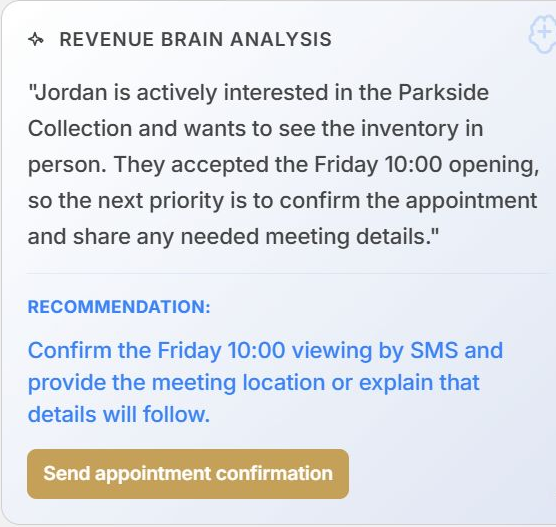
Jordan wants to see the Parkside Collection in person. Friday at 10:00 works for them.
Ready for your team to follow through.AI with a job to do
A customer asks a question. Tykuno answers it, collects the details, and helps arrange the next step. You decide what it can do and when someone on your team should take over.
Support SMS, email, and phone without starting over at every handoff. Use your approved business information to answer questions and collect what your team needs.
Reconnect with older enquiries, arrange bookings, chase missing paperwork, and guide customers through a longer process. Agree the workflow and exceptions with your team.
Bring supplier follow-up and cost visibility into scope where they fit your process. We define the data sources and boundaries with you before implementation.
Define where your team takes over. We agree the questions, decisions, and actions that require a person, along with the context they need to continue.
Configured around you
We add your products, answers, and rules, then test the setup with your team. We show you how to update it, so a change to your business does not mean starting again.

See how a message connects to a record update, a wait, and the next SMS. Your team sets the sequence and timing.
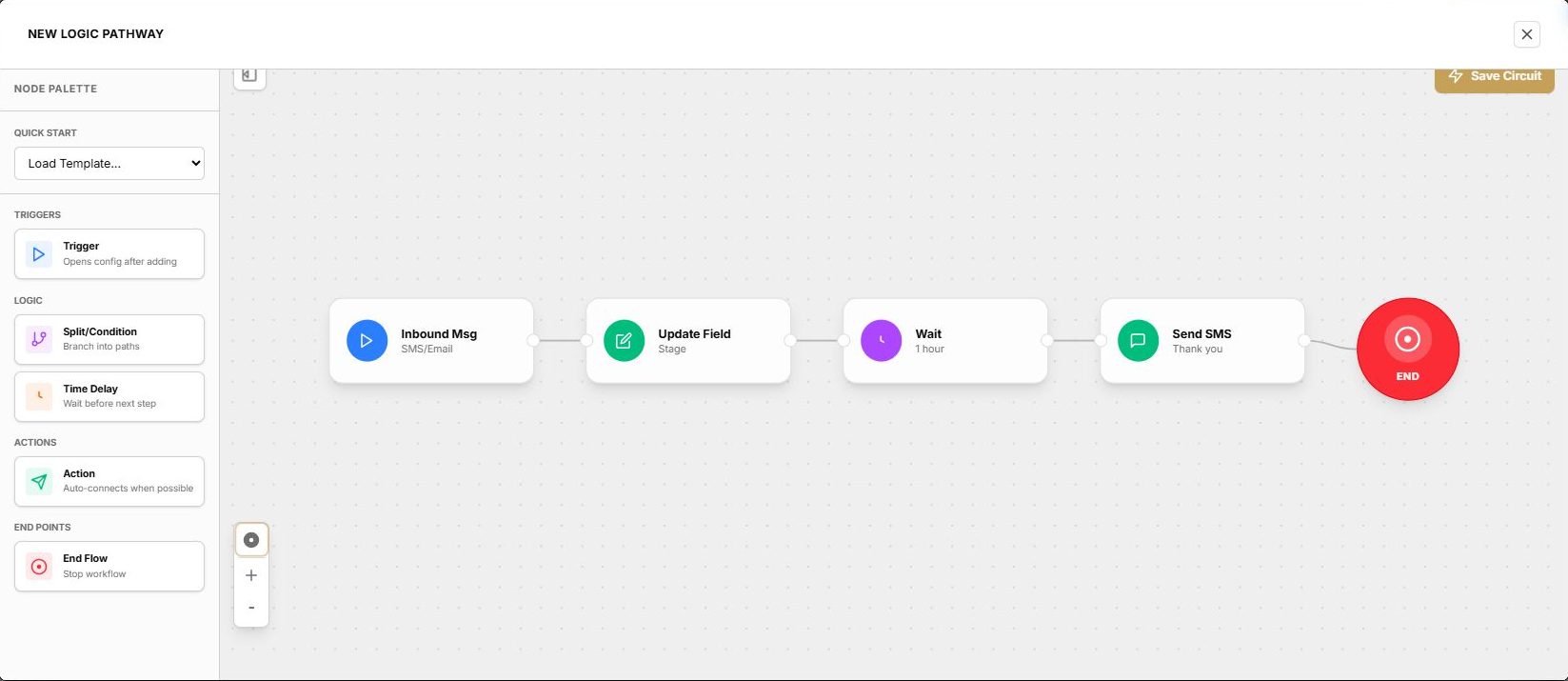
An incoming message updates the lead stage. The workflow then waits one hour before sending the next SMS.
Keep the tools you already use
Tell us which CRM, calendars, and other tools your team uses. We check how they can connect, what access is needed, and what work the connection should handle before we agree the setup.
Example scope for enquiry follow-up. These are the questions we resolve for your systems, not a promise that every connector supports every action.
The workflow capture above shows an incoming message, a field update, a wait and an SMS step. It shows the configured sequence, not evidence that an external CRM write or message completed.
Use the integration checklist| Connection | What it means | Availability |
|---|---|---|
| RealPage | Tykuno is a RealPage partner. Discuss the products and workflow your team uses. | Integration scope confirmed during scoping |
| Follow Up Boss | Customer sales workflow at Property Pro Partners. | In customer use |
| SMS, email, phone | Customer conversations and follow-up. | Available, configured per customer |
| Your CRM and other tools | Connect the records and steps your process depends on. | Assessed during scoping |
| MCP | Access Tykuno from supported AI clients, with configured access. | Discuss your preferred client |
| Web chat and pricing guardrails | Additional channels and quote checks. | Preview, not included as live capabilities |
A recent implementation
A customer brought us two systems new to their implementation: an SMS platform and a CRM. We connected both over the weekend after the agreement was signed on Thursday. This describes that deployment, not a delivery guarantee for every integration.
We handle implementation and training. Together, we agree what the workflow should do, how it connects and when your team takes over.
You bring: the current steps, approved information, systems and a person who owns the workflow.
We work through: the scope, access requirements, permitted actions and exceptions.
Before moving on: agree the workflow and delivery plan.
You bring: authorised access and feedback from the people who will use it.
We work through: connections, replies, actions, failed requests and human handoffs.
Before moving on: review the agreed scenarios together.
You bring: the team who will receive handoffs and manage the day-to-day process.
We work through: training, unresolved work and how to request changes.
Before moving on: agree ownership, ongoing support and the review plan.
We scope the workflows, channels, system connections and implementation work with you. The proposal sets out the price and agreed support. Timing depends on scope and access; we confirm the plan before starting.
Control and clarity
No. Some connections are in customer use, while others need configuration or new integration work. We assess your stack and confirm scope rather than assuming compatibility.
We handle implementation and teach your team to use and manage the system. We will agree any access, decisions, or technical support needed from your existing providers.
Yes. Tykuno is intended to adapt as your business changes. We agree how changes are requested, tested, and supported as part of your engagement.
Tell us what your team needs help with and which systems you use. We agree the work and give you a proposal.
Let’s make it work for you
Show us where leads go quiet or paperwork gets stuck. We’ll explain what Tykuno could handle and how it would work with your existing tools.